Software · Automation · Websites

Custom tools that save small businesses time

Based in New York · Working with clients anywhere (remote)

  • Live business sites
  • 3,500+ item catalog
  • Orders & invoices
  • Daily automations

Projects

Recent work

Live

CreativitiTeam

Website and private business system for a custom print & design business.

  • Order form with file uploads
  • Private owner admin: orders, invoices, money

Visit site
Live

Churchill Furniture

Inventory & catalog system for a furniture store.

  • 3,500+ items searchable by SKU, item or vendor
  • Photos, size filters and shareable item links
Visit site
Demo

Job board for a sign & print shop

A board that moves every job through the shop's real workflow.

  • Columns follow the shop's own steps
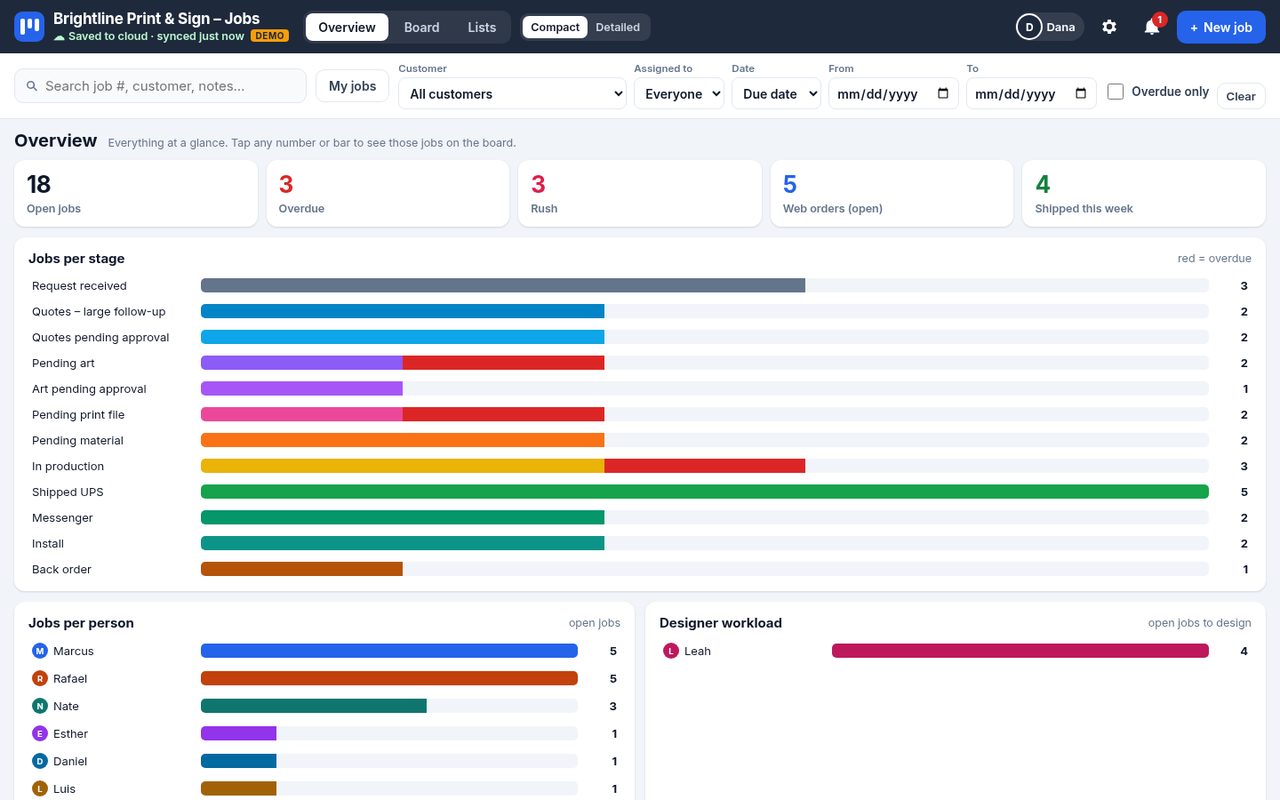
  • Overview charts by stage and by person
Demo on request
Case study: automation

Route & dispatch automation

Daily trips set up, dispatched and confirmed for a transportation company.

  • Each day's schedule built automatically
  • Trips sent to dispatch with the right driver
  • Riders texted, drivers checked
Ask about it
Sample data

Services

What I build

Websites

Fast, mobile-friendly sites that look great and bring in customers.

Admin & business systems

Your own private dashboard for orders, customers, invoices and money.

Job boards & workflow tools

See every job, who has it and what's next, on phone or computer.

Automations & integrations

Reminders, confirmations and reports that run on their own, connected to the tools you already use.

About

Hi, I'm Shulem

I'm a web & software developer based in New York, working remotely with small businesses anywhere. I build websites, private dashboards for orders and invoices, and automations that take the repetitive work off your plate.

You work with me directly, from the first chat to launch and after.

How I work

Simple, start to finish

  1. 1

    Free chat

    Tell me about your business and what slows you down.

  2. 2

    Clear plan & price

    You get the plan and the price in writing before any work starts.

  3. 3

    Build & check in

    You see progress along the way and we adjust together.

  4. 4

    Launch & support

    I put it live, show you how to use it, and stay around to help.

Let's talk about your project

Send me a message on WhatsApp or give me a call.

Let's talk
Live

CreativitiTeam

A custom print & design business needed a site customers can order from, and one private place to run the business.

Homepage on a phone
Homepage
Gallery of past work on a phone
Gallery
Order form with file upload on a phone
Order form
Chat assistant open on a phone
Chat assistant
Review page on a phone
Review page
Catalogs download page on a computer
Catalogs page
Gallery on a computer

The website

  • Mobile-friendly site with photo gallery
  • Order form with file uploads
  • Chat assistant that answers common questions
  • Catalogs download page
  • Review page for happy customers

The private owner admin

  • Orders and customers
  • Invoices and receipts
  • Money in and expenses
  • Inventory
  • Team accounts with roles and change history
  • Automatic weekly backups

The admin is private, so it isn't shown here.

Visit site
Live

Churchill Furniture

A furniture store needed one place to find every piece they carry: new and rental, in the warehouse or on special order, with photos and sizes.

Inventory catalog with item photos on a phone
Catalog with photos
Size filter open with Queen selected on a phone
Size filter
One item opened with photo, size, price and store link on a phone
Item details
Catalog filtered to sofas, each with its photo, on a computer
Catalog on a computer
Rental sofas with monthly prices on a computer
Rental items

Find anything fast

  • 3,500+ item catalog
  • Search by SKU, item name, color or vendor
  • New (retail) vs rental (used)
  • In stock only, or special orders
  • Filter by type, vendor and color
  • Sizes: Twin, Full, Queen, King, or width, depth and height in inches

Every item, ready to share

  • Photo with a full-size view
  • Size, color and price (or monthly price for rentals)
  • Link to the item on the store's website
  • Copy a link to any item to send to a customer
  • Warehouse, special order & dispatch log
  • Customer view and a private staff view

The staff view is private, so it isn't shown here.

Dispatch log: see where every truck drove, stop by stop, with planned vs off-route.

Dispatch map with each truck's route for the day in a different color
Each truck's route for the day
Map with numbered stops and the list of trucks with their stops
Trucks & stops
One stop opened with delivery window, call button and item list, personal details blurred
Stop details

Customer names, phone numbers and addresses are blurred.

Visit site
Demo

Job board for a sign & print shop

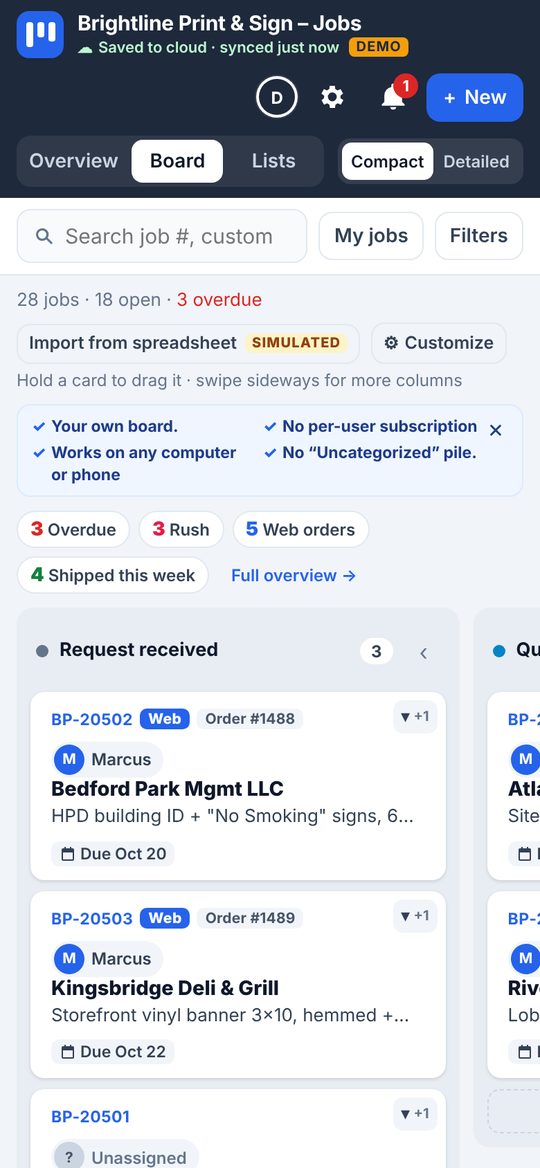
A sign & print shop wanted to see every job at a glance, from request to pickup, shipping or install. The demo runs on sample data for a made-up company, “Brightline Print & Sign”.

Board with compact job cards in workflow columns
The board, with compact cards
Board on a phone
On a phone
Open job card with assignee, designer, packed-by and UPS tracking
A job card: assigned to, designer, tracking
Customize panel for columns, card fields and colors
Customize panel: columns, fields, colors
Overview with charts per stage and per person
Overview charts
Demo available on request
Case study: automation

Route & dispatch automation

Transportation company · daily routes

Every day's trips set up, sent to the right driver and confirmed with riders, without anyone building it by hand.

  • Runs every day
  • Riders & drivers notified
  • Office stays in control
The problem

Every morning someone copied the schedule, read every rider's note, marked who wasn't riding and sent each trip to its driver by hand. Slow, and one missed note meant a wasted trip.

The solution

A system that does that routine on its own: builds the day, skips who's off, assigns and dispatches every route, then texts riders and checks drivers.

The result

The office reviews one short list instead of building the day from scratch. Riders know when to be ready, drivers are on time, and every change is on record.

What it does

A day with the system

  1. Midday

    Tomorrow is ready

    Schedule built, notes read, drivers assigned, trips sent to dispatch.

  2. Afternoon

    Double-check

    Confirms every trip reached its driver, then texts riders their pickup time.

  3. Evening

    Rider reminders

    Night-before reminder. A rider who replies C is taken off the route.

  4. Morning

    Drivers on time

    Sign-in check before the first pickup, and live “driver is close” texts.

How I work

  1. 1

    Learn the routine

    I sit with how the office really works today: the routes, the notes, the exceptions.

  2. 2

    Working demo

    A clickable demo on sample data, so you see the whole day running before anything is connected.

  3. 3

    Connect & test

    Hook it up to your dispatch and texting, then run it side by side with the old way.

  4. 4

    Switch on

    It runs every day. You get the dashboard, and I stay on call for changes.

Built with

  • Custom web dashboard
  • Dispatch system integration
  • Scheduled daily automation
  • Text message reminders
  • Automated driver calls
  • Holiday calendar
  • Works on any phone

Screens on this page are illustrations with sample data.

Running the same routine every day?

Let's put it on autopilot for your business too.